

Methvin User Interface
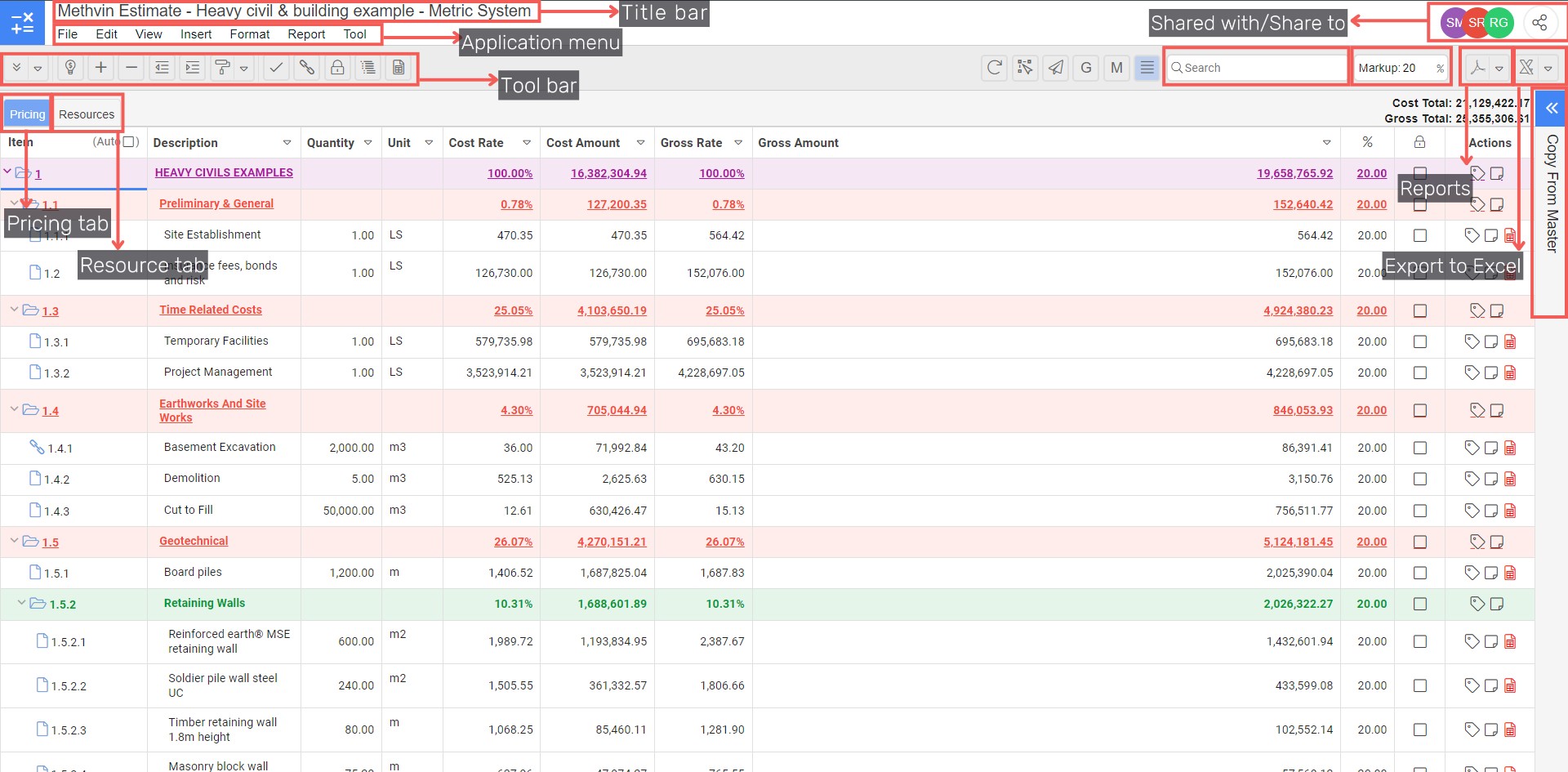
Methvin Navigation
Title Bar | Displays the estimate you are working in |
Application menu | Menu for File, Edit, View, Insert, Reports & Tools |
Application toolbar | Displays shortcuts specific to the application selected. This toolbar changes when a different application tab is selected |
Estimate button | To return to the Methvin home page |
Right click menu functions
The menu functions in Methvin are context sensitive; therefore, specific tasks can be performed from the context menu of pricing and resources tab.
- Record selector in Pricing tab
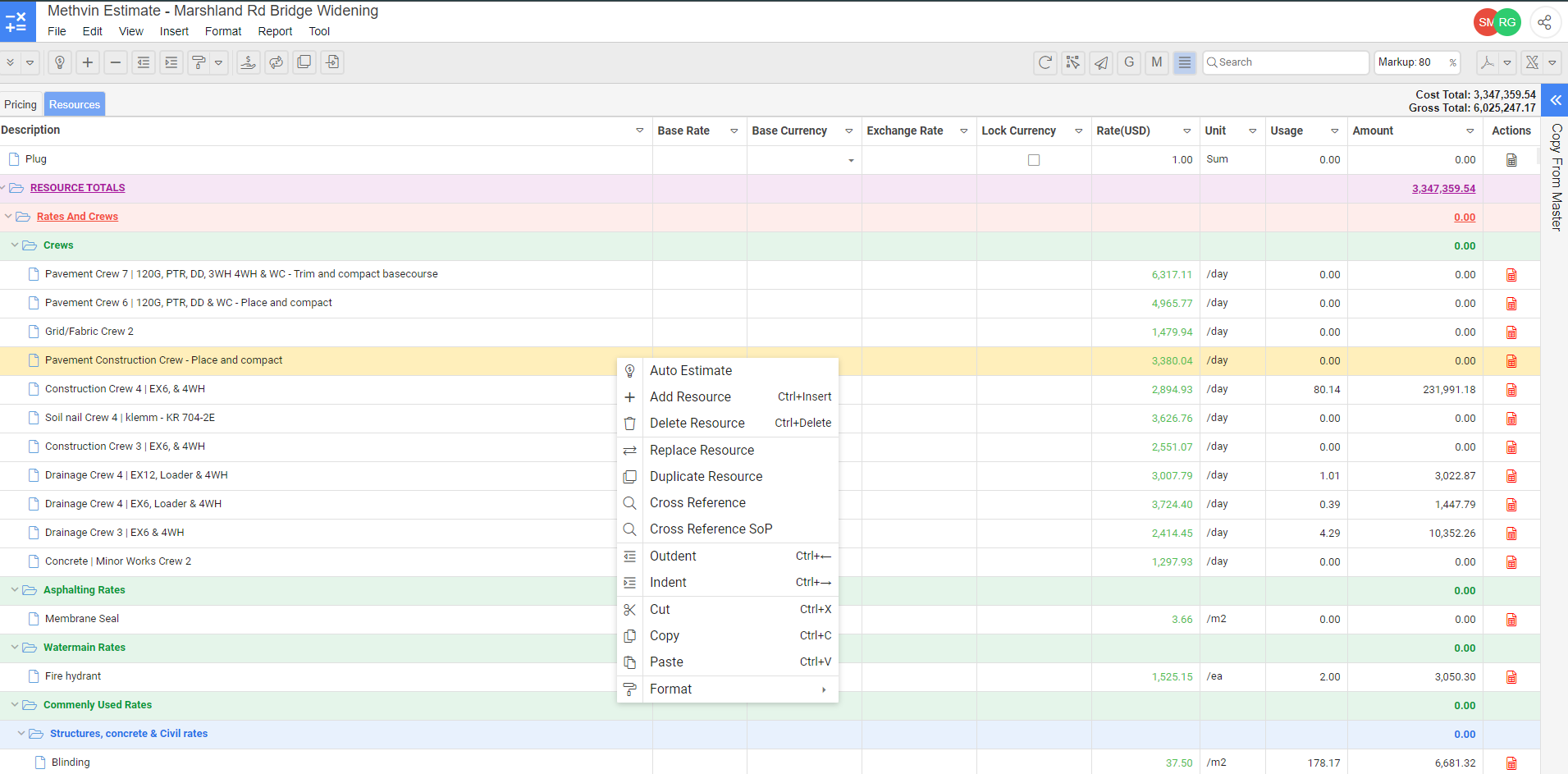
2.Record selector in Resources tab
Keyboard Shortcuts, Icons and Mouse Functions
Mouse Functions
Note: This table assumes that the mouse buttons are configured for a right-handed user.
Mouse action | Function |
|---|---|
Left-click | On an Active Document – moves the cursor line to and positions the editing cursor at the mouse pointer. On an Inactive Document – turns the document active and acts as above. |
Right-click | On an Active Document, calls up the context menu. |
Double Click | Fetch another document, e.g.: Double Click on a Net Rate calls up its Worksheet. |
Row Record + Left-click | Select a line of data for Dragging and Dropping. |
Row Record Shift + Left-click | Marks the Start and End of a Range of records for Dragging and Dropping. |
Keystrokes
This is a list of the Editing and Cursor Movement Keystrokes, with a brief explanation of the function, and the equivalent Icon if available.
Note: Normal Windows and Mac shortcut keys can be used e.g. Ctrl+C: Copy, Ctrl+V: Paste and ⌘Cmd+C, ⌘Cmd+V respectively etc.
Mac Keystrokes | Windows Keystrokes | Function for your Mac computer |
|---|---|---|
| Tab | Tab | Moves the cursor forward to the next Field. |
| Shift + Tab | Shift + Tab | Moves the cursor backwards. |
| ⌘ Cmd + ⇧ Shift + I | Ctrl + Insert | Inserts a new line at the cursor position. |
| ⌘ Cmd + ⇧ Shift + D | Ctrl + Delete | Deletes the current line at the cursor. |
| ⌘ Cmd + ⇧ Shift + > | Ctrl + > | Indents selected items and sets the line above as a parent item (WBS). |
| ⌘ Cmd + ⇧ Shift + < | Ctrl + < | Outdents selected items and removes the parent level of the above item (WBS). |
| ⌘ Cmd + C | Ctrl + C | Copy selected items to clipboard. |
| ⌘ Cmd + X | Ctrl + X | Cut selected items. |
| ⌘ Cmd + V | Ctrl + V | Paste content from clipboard. |
| ⌘ Cmd + A | Ctrl + A | Select all content. |
| ⌘ Cmd + Left Arrow | Shift + Left Arrow | Extends the highlighted area left one character. |
| ⌘ Cmd + Right Arrow | Shift + Right Arrow | Extends the highlighted area right one character. |